
STAAR practice, 3rd to 8th grade · Free through winter break
See where they'd land on STAAR, before test day.
Your kid plays a storybook adventure at home. You see about where they'd land on their grade's STAAR math and reading tests, from Did Not Meet to Masters, and the skills to work on. Turn on STAAR mode and most of their questions go to those skills.
- STAAR math and reading, 3rd to 8th
- Texas standards (TEKS)
- No ads, no store, no strangers
Sound familiar?
If you have a kid taking STAAR this spring, some of these may be yours.
-
“I won't know how they did until the scores come back.”
STAAR is in the spring, and the results come weeks after that.
An estimate all year
About where they'd land on each test, from Did Not Meet to Masters, kept up to date as they play.
-
“Which skills are actually on the test?”
The TEKS are long, and STAAR doesn't weigh them all the same.
The skills STAAR checks
Each one at their grade, marked strong, to work on or not checked yet.
-
“Test prep worksheets turn into a fight.”
Another packet, another argument at the kitchen table.
Practice in the adventure
Turn on STAAR mode and most of their questions come from the skills they need most, until they're strong.
-
“Their grades are fine. Are they really on grade level?”
A good report card and a Meets on STAAR aren't the same thing.
A grade level in every subject
Each subject as a school grade, beside the grade they're in.
Every subject, as a school grade
Beside STAAR, the parents' page puts each subject next to their grade: right on track, or how many grades ahead or behind, and which way it's moving.
On their first day, a short riddle game with the Sage gives you a first read, and it sharpens as they play.
See the parents' pageAva's grade: 3rd
- Math About 4th grade About a grade ahead
- Reading About 3rd grade Right on track
- Spelling About 2nd grade Building up to 3rd grade: a grade to go
- Science About 3rd grade Right on track
What Brightkeep does about it
On the parents' page today, shown for a demo family.
-
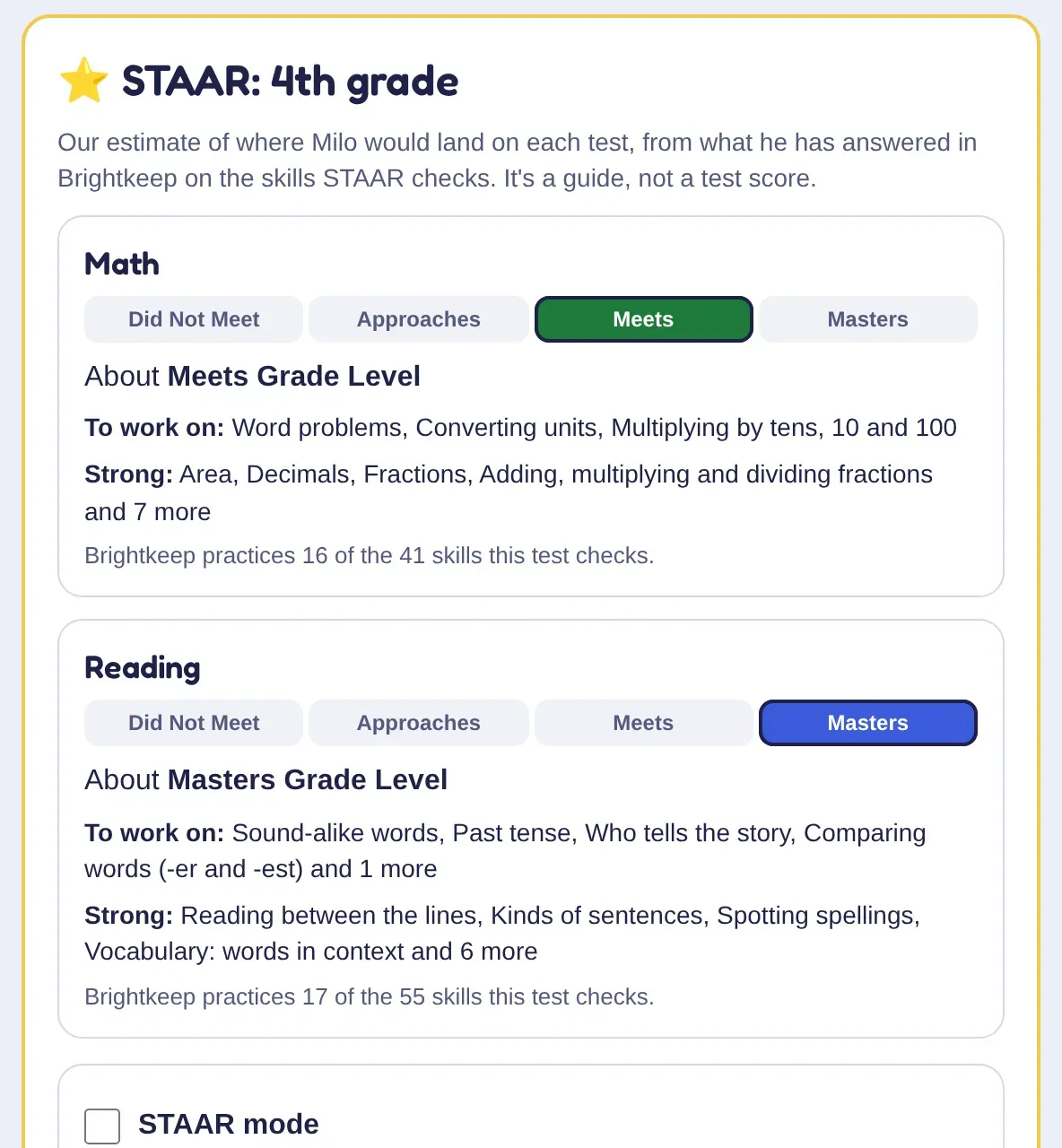
Where they'd land on STAAR
For each test, STAAR's four levels with your kid marked on one, the skills to work on, the strong ones, and how many of the test's skills Brightkeep practices.
-
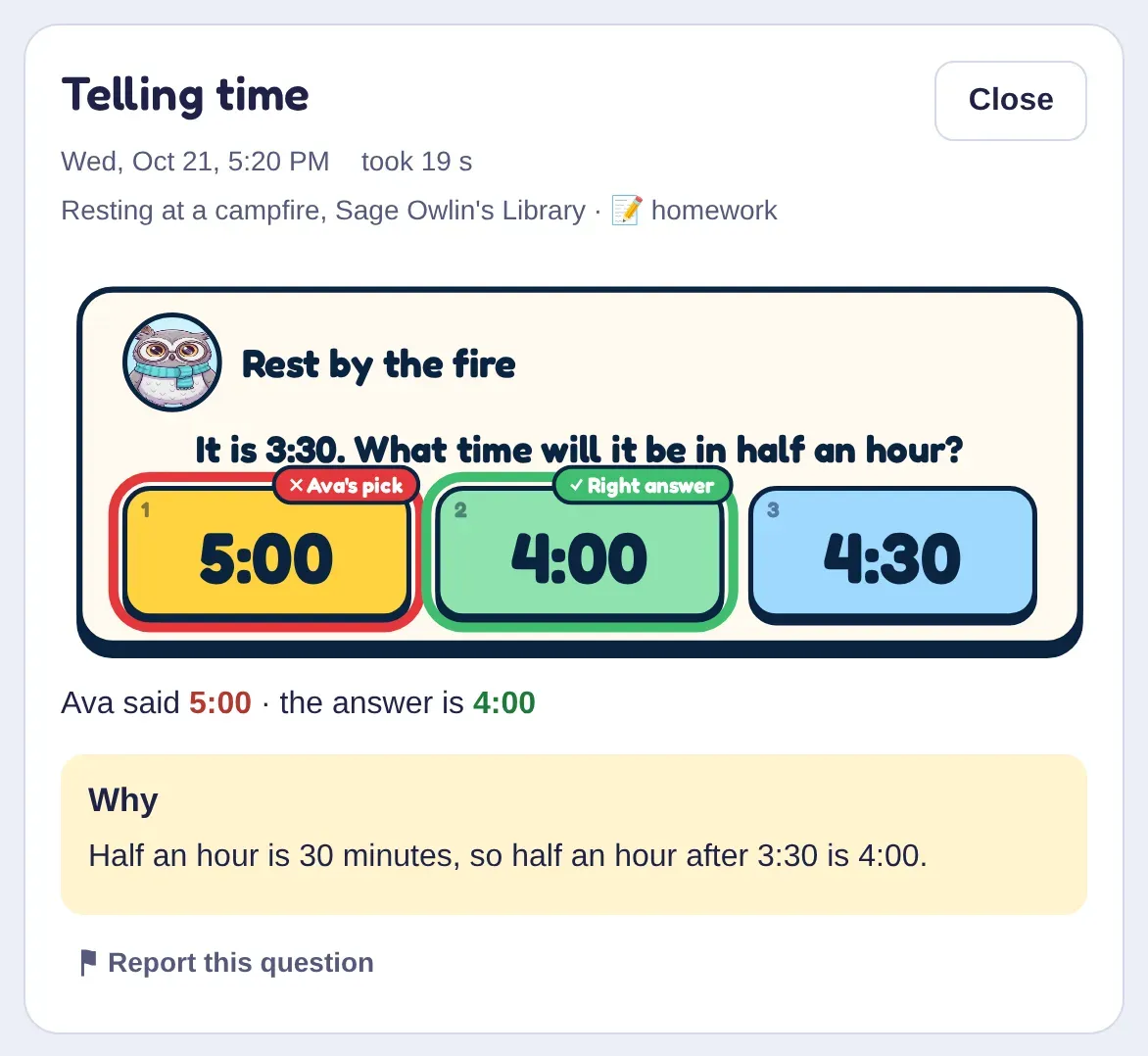
Every miss, explained
Each missed question with their answer, the right one and the reason, so you know what to go over without quizzing them yourself.
-
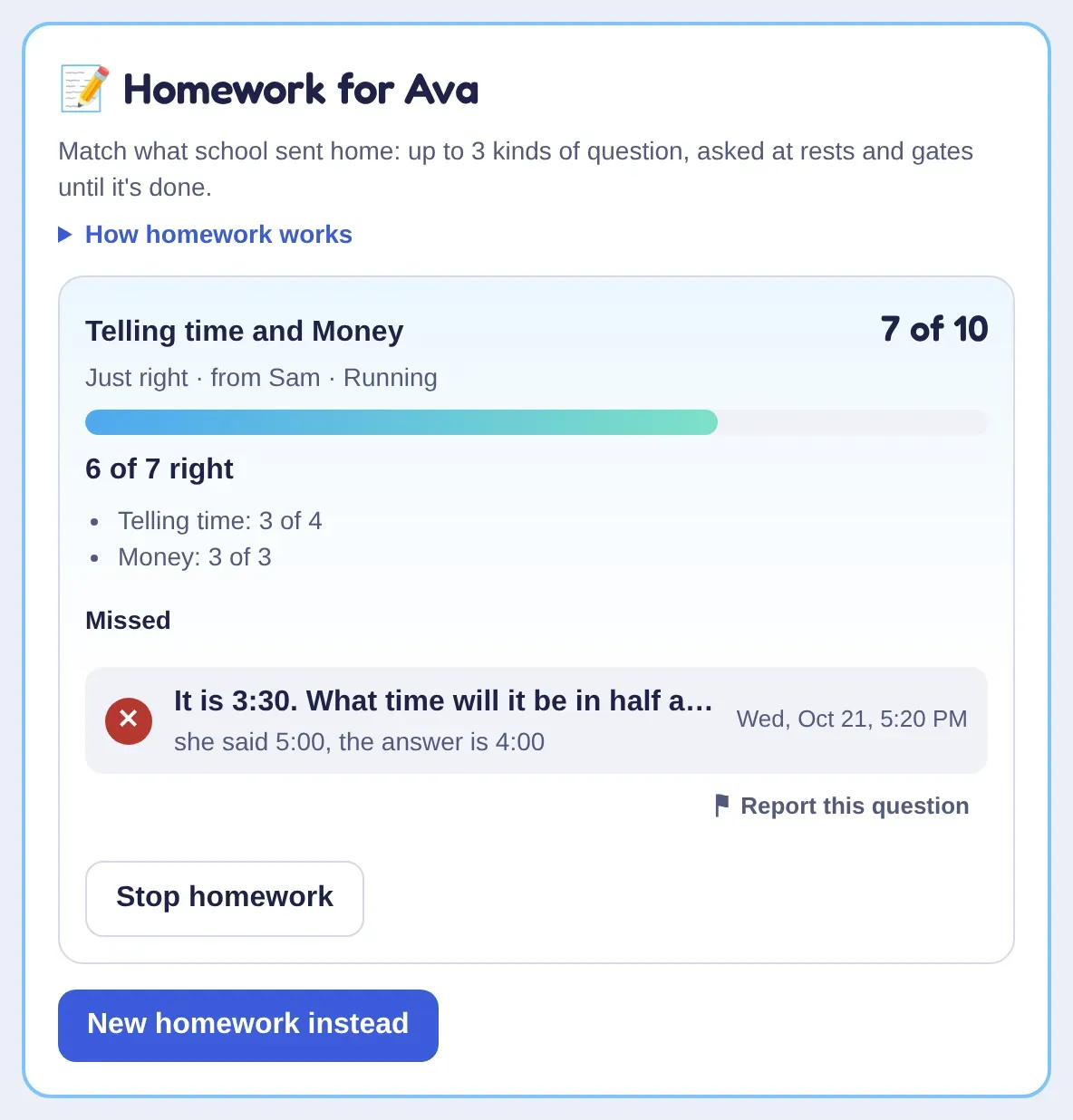
Homework, without the fight
Pick the kinds of question their class is on, or type in this week's spelling words. The adventure asks those for a while.
-
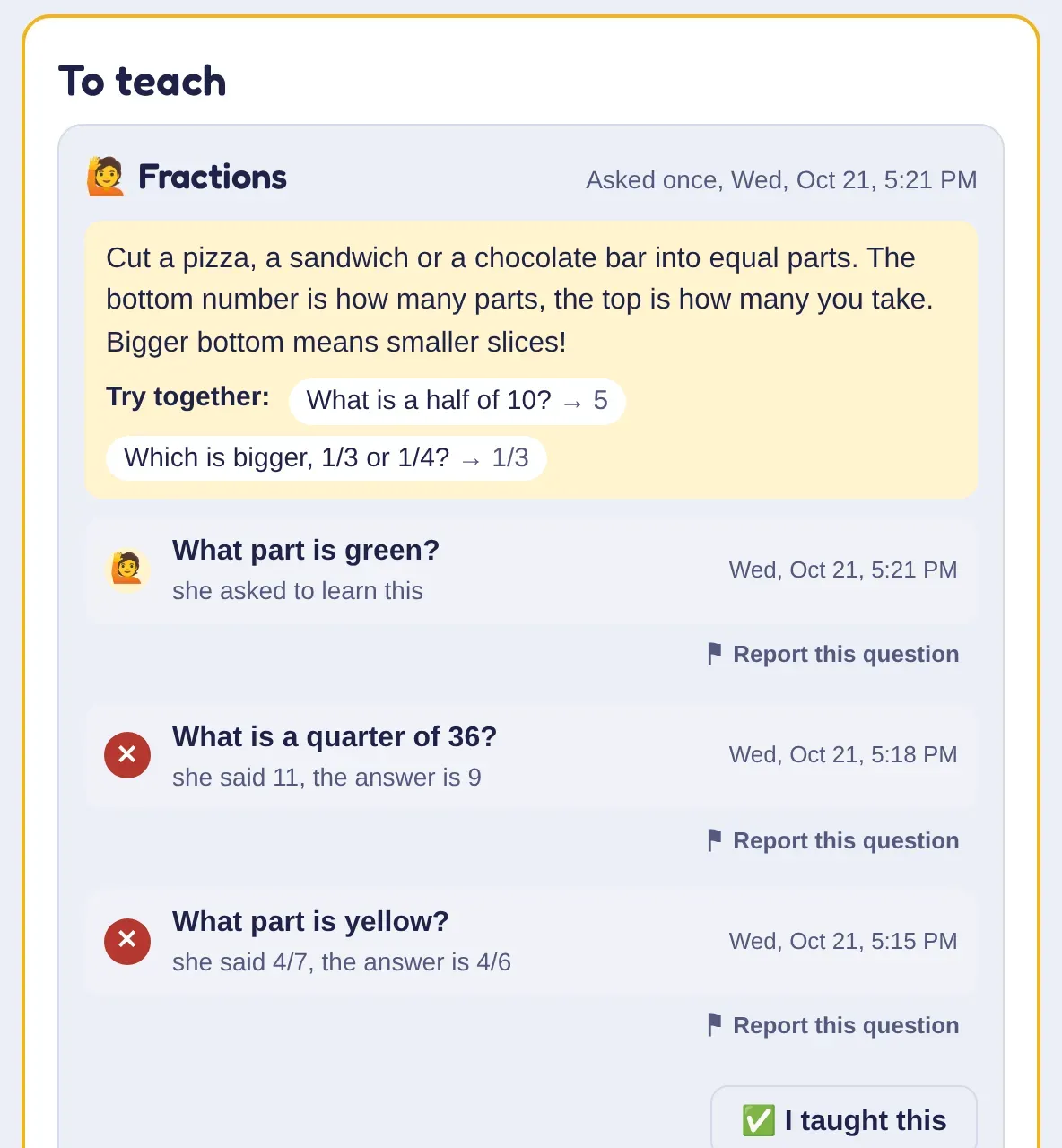
Told what to teach
Kids can tap “I haven't learned this yet”. It lands on your to-teach list with a tip and a couple of problems to try together.
What parents told us
From the first families to play. Most are people we know; we've said how.
-
“The twins have been asking to play after watching [their older brother].”
Jordan F., mom of twins, and a family friend -
“My daughter has been asking me all week to set this up for her.”
Danielle H., mom we met at our daughter's tumbling class -
“We're in. She's running it on her iPad. This is legit!”
Taylor O., dad and fellow software developer -
“That storyline and character setup is flawless.”
Ryan M., dad, and a friend
What Brightkeep isn't
- A STAAR test. The level is our estimate from the questions they answer in the game, not a score Texas gives.
- All of STAAR. Brightkeep practices 2 to 6 of every 10 skills each test checks, more in 3rd grade than in 8th, and the STAAR panel says how many for your kid's test.
- A writing program. STAAR reading asks kids to write; in Brightkeep they read and choose, but they don't write answers of their own.
- Science or social studies STAAR. Brightkeep has science and Our World, but its STAAR estimate is for math and reading.
Questions Texas parents ask
Answered plainly.

Something else on your mind? Jim reads every email. Write to us [email protected]
How do I turn on STAAR mode?
On the parents' page, pick Texas standards (TEKS) under Family, and add your kid's grade at school. Their Learning tab then shows a STAAR panel for their grade's math and reading tests, with a switch for STAAR mode.
Which grades does it cover?
3rd to 8th grade, math and reading: the STAAR tests Texas gives every year. For a younger kid, the parents' page still shows each subject as a school grade.
How does Brightkeep estimate a STAAR level?
From your kid's answers in Brightkeep on the skills each test checks, with the skills STAAR asks about most counting the most, and Texas's own lines between Did Not Meet, Approaches, Meets and Masters. It waits until enough of the skills have answers to tell. It's a guide, not a test score.
What does STAAR mode change?
About 7 in 10 of their questions come from the STAAR skills they need most: the ones to work on first, then the ones not checked yet. The rest of the adventure stays the same, and you can turn it off any time.
Does it follow the TEKS?
Yes, once you pick Texas standards. Your kid's checklist then lists each grade's skills by the TEKS, with their codes, and the game makes sure they practice those.
What does it cost?
Free until January 4. After that, $49 a year for families who join by November 30, and $129 a year for everyone else. Everything that comes with it is in the offer below.Free until January 4. After that, $129 a year or $14.99 a month; families who joined by November 30 keep $49. Everything that comes with it is in the offer below.
- What's included
- Every subject, land, quest, pet and parent tool, the Sunday email included. Nothing to buy inside the game.
- Kids
- As many as you have during the beta. After it, 2 kids, plus $29 a year for each extra pair, up to 6.
- Paying early
- Optional: pay your first year now from the Plan page, $49 plus tax where it applies. The paid year starts when the beta ends, January 4, so you lose none of it.
See where they'd land on STAAR
New families come in a few at a time, with new spots every Monday. When a week is full, leave your email for first dibs on the next.
No card needed. By signing up you agree to our Terms and Privacy Policy.
You're on the list.
We sent a short note to . When the next spots open, you'll get first dibs: one saved for your family for 48 hours.
Join by Cyber Monday, November 30, and you get:Join now, and you get:
$49 a year, locked in
For as long as your plan keeps going. Families who join after November 30 pay $129 a year.
$129 a year, once the beta ends
Or $14.99 a month. Families who joined by November 30 keep $49.
A whole year costs about one hour with a math tutor.A whole year costs about three hours with a math tutor.
A math home tutor: $40–$50 an hour, Thumbtack's national average, as of October 22, 2026. This compares price only: a tutor and a game do different jobs.
-
Your kid's drawing, painted into the world
Each kid can send one. Jim picks the ones that fit and has them painted in, with the credit you choose. See what's in so far
-
A donation equal to your first year
For the first 10 families who pay, to your school's PTO, your homeschool co-op, your library, or First Book, which puts books in kids' hands. If you take the 30-day money-back guarantee, there's no donation.
-
Free until January 4, no card
Every kid in the family plays. Nobody is charged unless you choose a plan.
-
Your kid asks to play, or your money back
Email [email protected] within 30 days of your first payment and we'll refund all of it and end the plan. One email is enough.
Joining the waitlist by November 30 counts, even if your invite comes later.Families who joined the waitlist by November 30 keep the founding price, even if their invite comes later.
- Press Start free. A grown-up account with your email. No card, nothing to install.
- Add your kids. A first name and an age each, and they play on a tablet, phone or computer.
- See where they stand. Their first day gives you a read in every subject, and Sunday brings the first email.
 Know a family who plays? They can invite you straight in, even when the week is full.